Guide
An ExifTool GUI for Mac: the same engine, with a preview, an undo and a report
Archyv puts a native Mac interface over the bundled ExifTool — the current values on screen before you write, a change history you can undo, and a per-file report of what happened.
If you have gone looking for a way to read or write photo metadata properly, you have arrived at ExifTool. It is the reference implementation for this entire problem: Phil Harvey has maintained it since 2003, it understands more formats and more tags than anything else in existence, and it is free. What it does not give you is a window: no preview of what a command will do to five thousand files, no undo across a batch, and no report of which files silently failed.
Archyv is a native Mac app that drives that same ExifTool — it bundles it, and every change the Metadata Editor writes goes through it. What you add is the layer in front: the current values on screen before you write, a simulation of the whole run that changes nothing, a change history you can undo, validation as you type and a per-file report at the end. Below: what the front end adds and where it stops — and, at the end, how to install ExifTool on a Mac and the commands worth knowing if you would rather work at the command line.
What a front end over the same engine adds
Archyv is a native Mac app driving the same ExifTool underneath. What you are paying for is precisely the five gaps the command line leaves open — set out in full at the end of this page.
A preview before the write. Simulation Mode performs the whole run and changes nothing, writing every intended change to the log. On a large batch, reading that first is the difference between confidence and hope.
A change history. Operations that modify files in place are recorded and can be undone for a retention period you choose. There is also a setting to copy each file before any metadata write.
Validation as you type. The Metadata Editor checks emails, URLs, dates and coordinates against their field types, and enforces IPTC’s own limits — the Category field really is capped at three characters, and finding that out from a rejection notice is worse than being told up front.
A per-file report. The log shows each file’s previous and new values, and what succeeded, skipped or failed.
Composed operations. Renaming, folder generation, transfer, conversion and metadata editing are separate processes over one selection, driven by saved templates.
The same job, both ways
Take a concrete one: 49 photos from a single trip, none of them carrying a country code, all of which should say Costa Rica.
At the command line that is one line, and it is a good line:
exiftool -CountryCode=CR /path/to/tripRun it and 49 files are written, plus 49 _original backups beside them. What you do not get is any view of the state before the write — you are trusting that none of them already had a different value — and confirming it landed means a second command and reading 49 lines of output.
In Archyv’s Metadata Editor the same job is Batch mode, the Location category, the Country Code (ISO 3166) field, and the value:
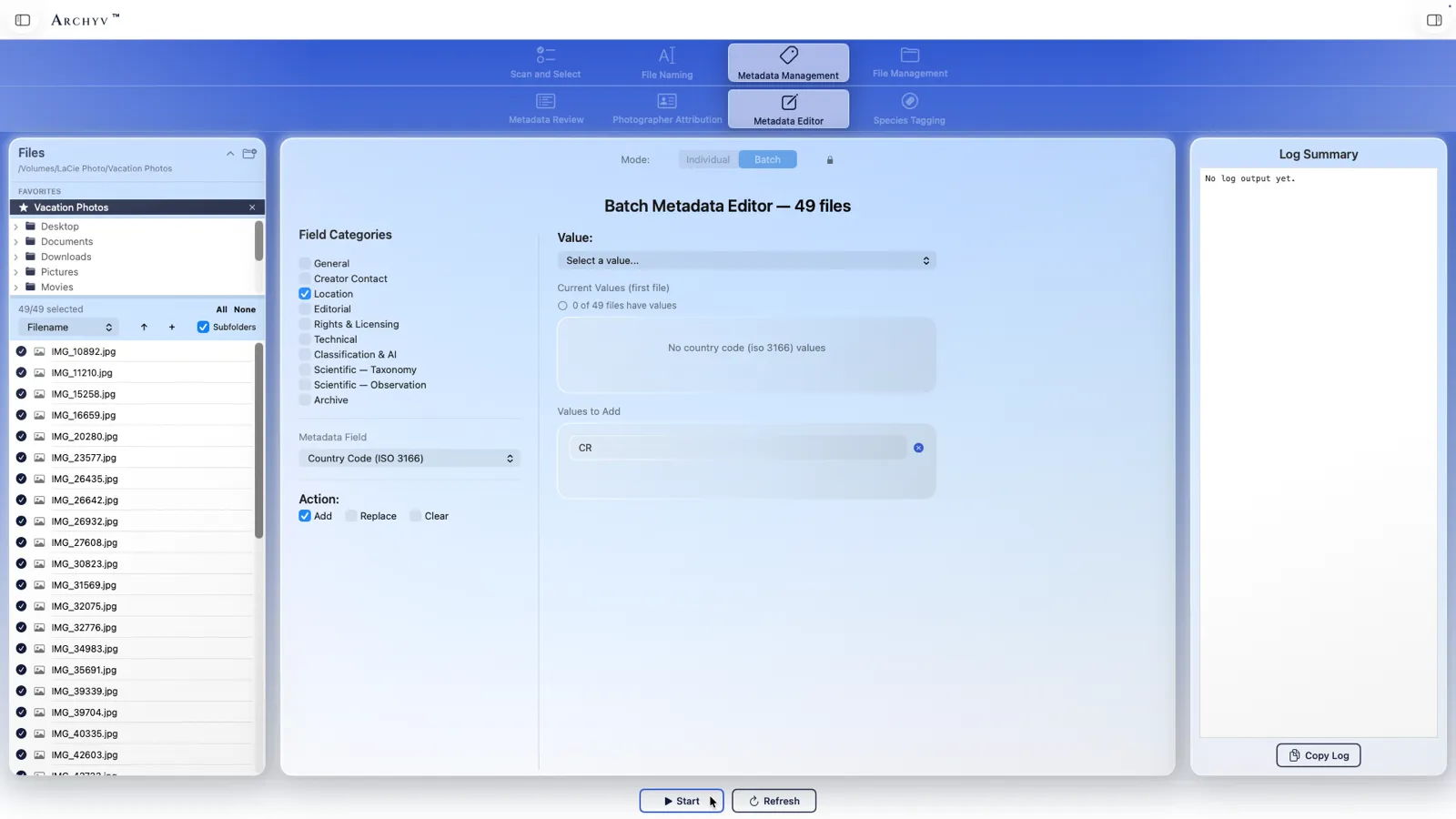
The panel reports the before — here, 0 of 49 files have a value — before you have typed anything, and the action is explicit: Add, Replace or Clear. Start writes the batch through the same ExifTool, and the log lists each file’s previous and new value with its outcome.
Individual mode is the same editor one file at a time, for the metadata that differs from photo to photo — a keyword, a caption, a species — with the current values and the pending ones shown side by side so nothing is overwritten by surprise:
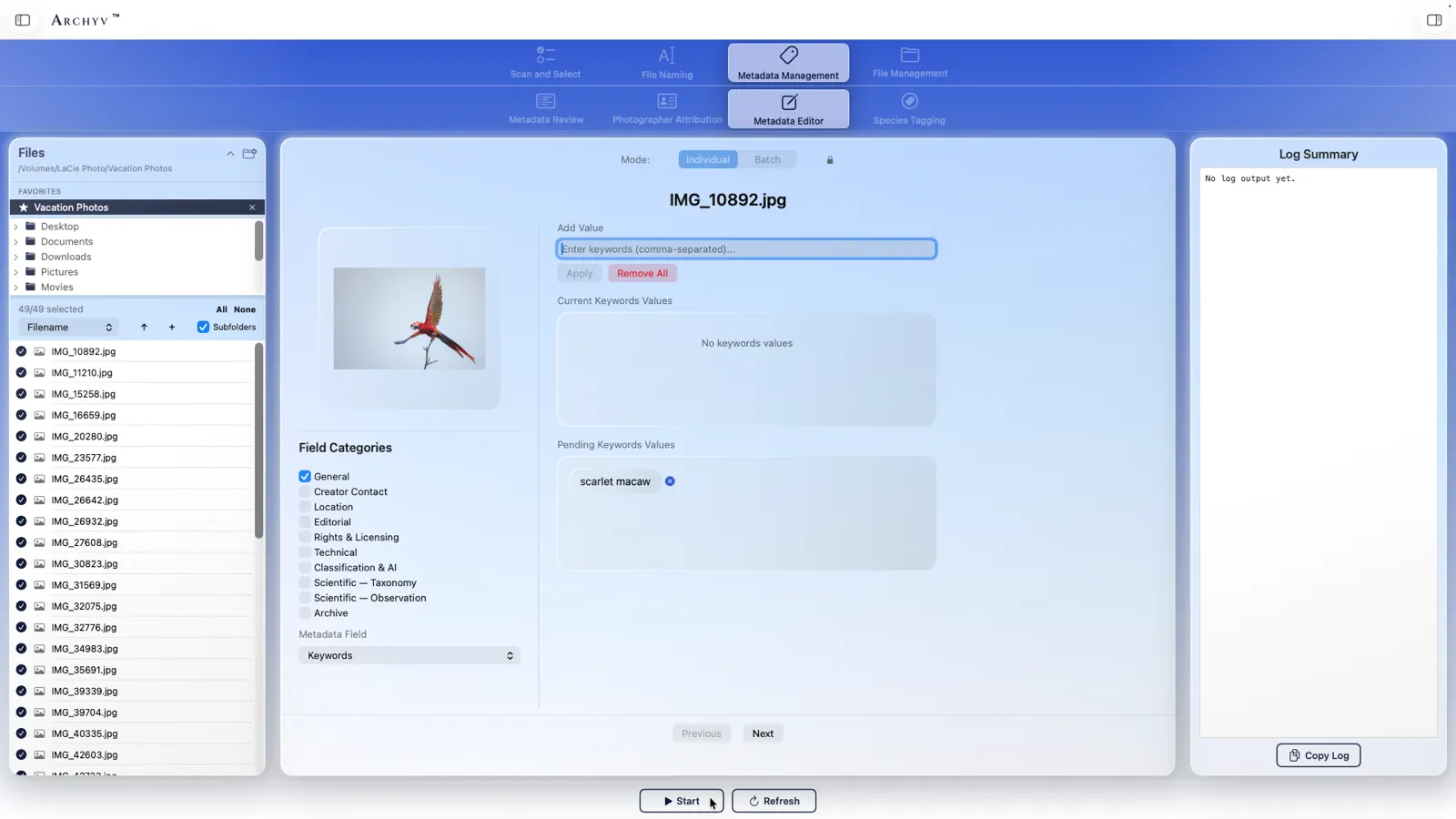
None of this is beyond ExifTool. All of it is beyond ExifTool at a glance, which on a large batch is the difference that matters.
What it does not replace
Be clear about the boundaries.
If you need a tag ExifTool exposes and Archyv’s field list does not surface, the command line is still where you go. If your workflow is a cron job or a build step, a GUI is the wrong shape entirely — script ExifTool. And if you are comfortable in a terminal and your batches are small, ExifTool alone is a complete answer, and you should not spend money to replace it.
ExifTool remains free, and Archyv is a one-time $99 per seat. The honest case for paying is scale and consequence: many files, files you cannot recreate, or work you have to hand a client and be able to verify. If that is not your situation, the free tool is genuinely the right call.
What ExifTool is, and why everything else defers to it
ExifTool is a command-line program that reads and writes metadata in image, video and audio files. EXIF, IPTC, XMP, GPS, maker notes, the proprietary corners of every RAW format — it handles all of it, and where formats disagree it usually knows the exception.
This is why so much photo software quietly ships it rather than reimplementing it. Archyv bundles ExifTool too, and it is not a small dependency: every change the Metadata Editor writes goes through ExifTool, and Photographer Attribution writes images through it as well, with videos and RAW files handled by it exclusively. When Archyv reads 40 formats and writes metadata to 32 of them, that reach is ExifTool’s.
That is worth saying plainly, because it frames this whole page. Nothing here argues that ExifTool is the wrong tool. It is the right tool. The question is only what sits in front of it.
Installing it on macOS
Two straightforward routes.
Homebrew, if you have it:
brew install exiftoolThe official installer from exiftool.org — a standard .pkg for macOS, no package manager required.
Check it worked:
exiftool -verThe commands worth knowing
Most real work is a handful of patterns.
Read everything in a file:
exiftool photo.jpgRead one tag, or a group of them:
exiftool -DateTimeOriginal -Artist -Copyright photo.jpgWrite a tag across a whole folder:
exiftool -Artist="Jane Rivera" -Copyright="© 2026 Jane Rivera" /path/to/folderStrip location data before publishing:
exiftool -gps:all= /path/to/folderRename files from the capture date:
exiftool '-FileName<DateTimeOriginal' -d %Y%m%d-%%.4nc.%%e /path/to/folderTwo things to know before running any of those. ExifTool writes _original backup copies alongside your files by default — reassuring, and it will double the size of the directory until you clear them. And -overwrite_original suppresses that, which is the flag that turns a mistake into a permanent one.
Where the command line stops being pleasant
Not an argument against ExifTool — an observation about one shape of job.
You cannot see what will happen before it happens. There is no preview: you run the command and inspect the result. Fine on five files, a leap on five thousand.
There is no undo across a batch. The _original copies help — until you have used -overwrite_original, or the run moved or renamed things.
The syntax does not stay learned. Date formatting, -TAG= versus -TAG<, group prefixes, how each RAW format wants to be written — re-learned every few months.
Nothing reports back. A run where a hundred files silently failed looks identical to one where everything worked.
Composing operations is manual. “Rename from the capture date, then file into dated folders, then write the copyright, and tell me which had no date” is four commands and a shell loop to maintain.
Those five gaps are exactly what the front end described above was built to close.
Next: if the front-end case is the one you recognise, Metadata Editor covers the ten field categories and Photographer Attribution covers writing creator and date fields across a batch. For renaming from the capture date without touching a terminal, see renaming photos by date taken.